





Apartment living changes the way a solar generator shouāld be evaluated. There may be limited floor space, shared walls, fewer storage areas, and several important devices concentrated in only a few rooms. A useful setup should fit naturally into that environment while providing meaningful backup power when needed. Capacity still matters, but apartment buyers should also consider footprint, operating sound, outlet access, and home-office continuity. The best choice is one that becomes part of the living space rather than demanding a separate area of its own.
Table of Contents
Choose Around the Space You Actually Live In
Give the Power Station a Real Address
Before comparing specifications, decide exactly where the power station would live. It might sit beside a desk, near an entertainment area, or in another suitable indoor location where important equipment is accessible. Measure that space rather than estimating it. The Anker SOLIX S2000 measures 8.2 × 11.1 × 12.7 inches and weighs 35.7 pounds. Anker describes it as its smallest and lightest 2kWh power station, with a 30% smaller and 25% lighter design in its stated comparison. Those dimensions make the specification easier to judge in an apartment context. Instead of asking whether a unit is generally “compact,” buyers can determine whether its actual footprint works with their furniture, storage plan, and available floor area.
Consider What Quiet Hours Mean at Home
Sound becomes more noticeable when sleeping, working, cooking, and relaxing happen within a relatively small area. For apartment residents, operating noise therefore deserves a place on the buying checklist alongside battery capacity and output. The S2000 is rated at 30 dB while powering home essentials under 600W. Anker also provides a Silent Mode through its app for quieter operation. This makes sound particularly relevant when a portable solar power generator may operate near a desk, living area, or other regularly occupied space. Buyers should check the stated noise conditions rather than treating quiet operation as a vague feature. A clearly defined sound figure makes it easier to judge how the station may fit into normal apartment routines.
Map Out Where the Cables Will Go
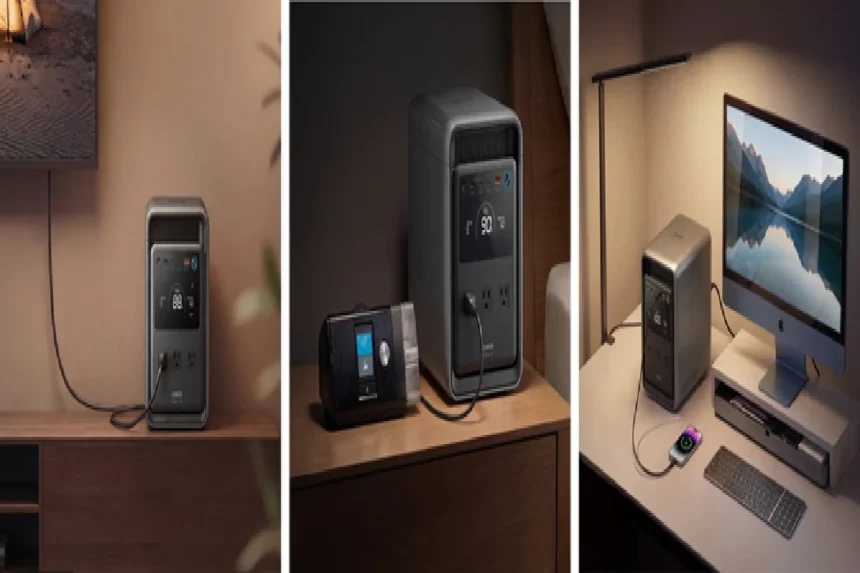
Apartments often place important electronics close together. A desk may contain a laptop, monitor, router, and charging equipment, while another area holds a television and other devices. Outlet layout affects how neatly a power station can serve these clusters. The S2000 provides eight outlets positioned across its front and rear, allowing equipment to connect from more than one direction. This can simplify placement because the station does not have to face every connected device from a single side. Before buying, sketch the intended setup and note where cables would run. This small exercise turns outlet count into something practical. It also helps determine whether the chosen location provides convenient access to the devices that matter most during backup operation.
Build Apartment Backup Around a Few Priorities
Decide What Deserves Backup First
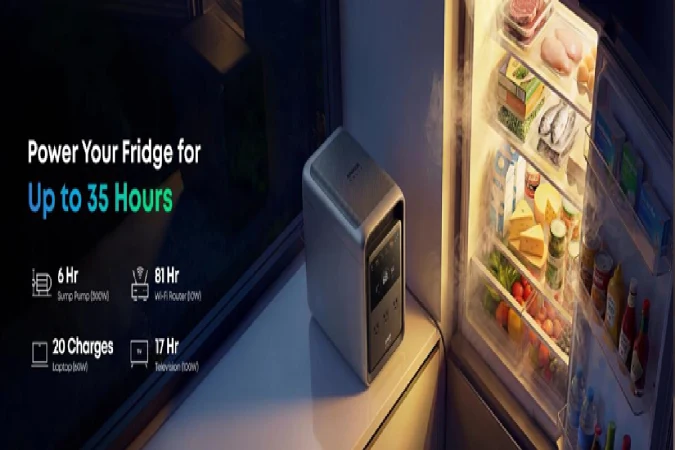
An apartment power plan does not have to begin with every electrical item in the home. Start with a small priority group. Refrigeration may protect stored food. A router keeps communication available. A laptop supports work, while selected lighting and electronics cover basic daily needs. The S2000 stores 2,010Wh, and Anker provides several individual runtime examples that illustrate how different loads draw on that energy. These include up to 35 hours of refrigerator backup, 81 hours for a 10W Wi-Fi router, 20 charges for a 60W laptop, and 17 hours for a 100W television under the stated conditions. Thinking in priorities gives apartment residents a clearer reason for choosing a particular capacity than simply selecting the largest number available.
Protect the Home Office as Its Own Zone
For someone who works from an apartment, a power interruption can affect more than household comfort. The desk itself becomes a priority zone. A laptop, router, and other essential office electronics may need continuity while work is in progress. The S2000 includes a 10 ms UPS switchover designed for home-office applications. Its 1,500W rated AC output and 3,000W peak output provide additional context when checking the requirements of planned equipment. This creates a useful selection method for remote workers: list the devices that keep the workspace functioning, check their power requirements, and then evaluate the station around that specific group. The result is a backup plan shaped around an actual apartment activity rather than a generic collection of appliances.
Match Recharging to the Apartment Routine
Solar capability does not mean every charging session must happen through a panel. Apartment residents may have several supported options depending on their space and daily routine. The S2000 supports six recharge methods and accepts up to 1,600W AC input. Anker states that a 1,600W wall outlet in UltraFast Mode can recharge the station to 80% in 1.2 hours under the specified conditions. The unit also supports up to 400W solar input and is offered with either a 200W or 400W bifacial solar panel. Where solar charging is appropriate, residents can consider the usable sun exposure available to them and follow building rules and product setup guidance. The important point is flexibility: charging should fit the home rather than dictate how the home operates.
Conclusion
Choosing a solar generator for an apartment starts with the living space itself. Decide where the station will sit, how sound affects nearby activities, which devices need convenient connections, and what deserves backup priority. Remote workers can also treat the home office as a dedicated power zone. With its compact dimensions, 2,010Wh capacity, eight outlets, 30 dB operation under 600W, and 10 ms UPS switchover, the Anker SOLIX S2000 illustrates how power specifications can translate into practical apartment use.