






Healthcare setting is hectic and data intensive. Nurses, clinicians and doctors need to make some vital decisions based on the immediate access to patient information. A medical mobile workstation is an important tool that facilitates healthcare workers to retrieve digital patient data, update patient information, and conduct clinical operations at the point of care.
These mobile computer solutions are now an inseparable component of the contemporary hospital system. They enhance efficiency in workflow, minimise documentation errors and enable medical workers to be close to their patients and gain access to important information. It is a guide on all you have to know about medical mobile workstations, their operation, advantages and how hospitals can select the appropriate system.
Table of Contents
What is a Medical Mobile Workstation?
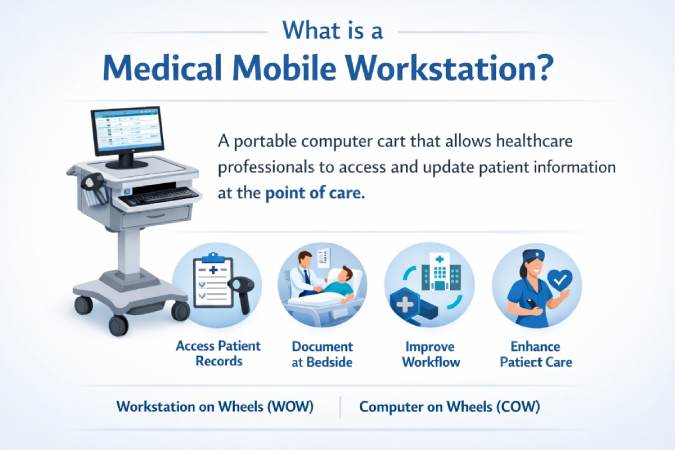
Medical mobile workstation is a computing station that is placed on a mobile cart and any healthcare professional can access and update patient information anywhere in a healthcare facility. They are usually known as Workstations on wheels (WOWs) or Computers on Wheels (COWs). They have been designed to facilitate point-of-care computing, where clinicians can execute activities like:
- Accessing electronic health records
- Documenting patient observations
- Reviewing diagnostic results
- Managing medications
- Communicating with other healthcare teams
Mobile workstations enable healthcare staff to update patient information in real time while standing at the patient’s bedside, reducing reliance on memory-based documentation later.
Key Components of a Medical Mobile Workstation
A typical mobile workstation includes several integrated components designed to support healthcare workflows.
Computer or Tablet System
The workstation usually includes:
- A computer or laptop
- Tablet system
- Touchscreen monitor
This device connects to hospital networks and electronic health record systems.
Adjustable Workstation Frame
The cart structure is designed for flexibility and ergonomics.
Features often include:
- Height adjustment
- Swivel monitor arms
- Keyboard trays
- Storage drawers
These adjustments allow clinicians to work comfortably whether standing or seated.
Power System and Batteries
Many medical workstations are powered by high-capacity batteries that allow continuous operation during long shifts.
Battery systems enable healthcare professionals to move between wards without losing power.
Powered carts typically operate for several hours before requiring recharge.
Accessories and Peripherals
Hospitals often customize mobile workstations with additional tools such as:
- Barcode scanners
- Medication drawers
- Printer mounts
- Storage bins
- Camera mounts
These accessories allow staff to carry everything needed for patient care in one mobile unit.
Types of Medical Mobile Workstations
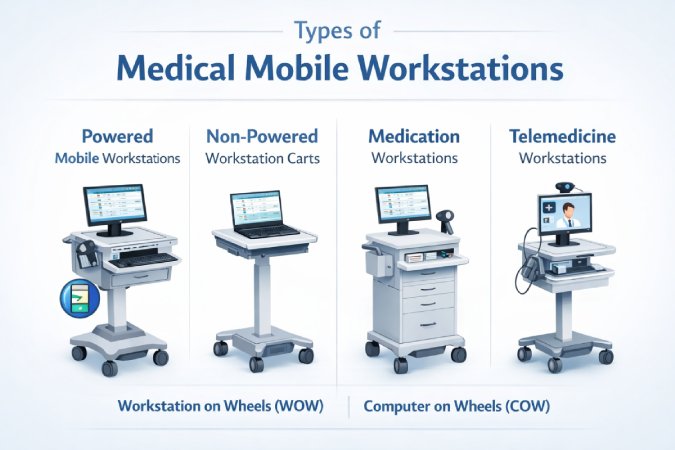
Healthcare facilities use different types of mobile workstations depending on their operational needs.
Powered Mobile Workstations
Powered workstations include battery systems that support computers, monitors, and peripherals.
These carts allow continuous access to digital systems throughout long shifts.
They are commonly used in:
- Emergency departments
- Intensive care units
- Hospital wards
Non-Powered Workstation Carts
Non-powered carts are simpler units designed primarily to hold laptops or tablets.
They are typically used for:
- Basic documentation
- Administrative work
- Outpatient clinics
Medication Workstations
Medication carts combine computing capabilities with secure medication storage.
Features often include:
- Lockable drawers
- Barcode scanning
- Medication tracking systems
Telemedicine Workstations
Telemedicine carts enable remote consultations by integrating:
- Cameras
- microphones
- video conferencing tools
These workstations allow specialists to consult with patients remotely.
Benefits of Medical Mobile Workstations in Healthcare
Medical mobile workstations provide numerous advantages for healthcare facilities.
Improved Workflow Efficiency
Healthcare staff often move between multiple patient rooms during a shift. A mobile workstation eliminates the need to repeatedly return to a central nurse station.
This significantly improves workflow efficiency and reduces time spent traveling between workstations.
Real-Time Patient Documentation
Immediate documentation is critical for patient safety.
Mobile workstations allow clinicians to record observations, update records, and review lab results during patient interactions.
This reduces the risk of forgotten details and documentation errors.
Better Patient Care
Having access to patient data at the bedside enables healthcare professionals to make faster decisions.
Mobile workstations also improve communication between caregivers by ensuring updated patient information is available across departments.
Infection Control
Mobile workstations help reduce the spread of infections by allowing clinicians to stay within a ward instead of moving frequently between departments.
Proper cleaning procedures and protective accessories further improve infection control practices.
Cost Efficiency
While mobile workstations require an initial investment, they often reduce long-term operational costs.
Benefits include:
- Reduced documentation errors
- Faster workflows
- Improved staff productivity
These improvements contribute to overall hospital efficiency.
Key Features to Look for in a Medical Mobile Workstation
Choosing the right workstation requires evaluating several important features.
Ergonomic Design
Healthcare staff spend long hours using workstation carts.
Ergonomic features such as adjustable height, monitor tilt, and flexible keyboard trays help reduce physical strain.
Height Adjustment
Height adjustment allows staff to work comfortably in both sitting and standing positions.
This flexibility improves usability across different departments.
Battery Life
For powered carts, battery life is critical.
Hospitals typically prefer workstations capable of operating for an entire shift without recharging.
Mobility and Stability
Smooth mobility is essential for moving between patient rooms.
Key mobility features include:
- Lockable casters
- lightweight frames
- maneuverable base design
Security and Data Protection
Medical data security is a top priority.
Modern workstation carts include features such as:
- encrypted login systems
- biometric authentication
- secure device mounts
How Hospitals Use Mobile Workstations
Medical mobile workstations support a wide range of hospital operations.
Patient Rounds
Doctors and nurses use mobile workstations during patient rounds to review charts and update records instantly.
Emergency Departments
Emergency departments rely on rapid access to patient information.
Mobile workstations enable clinicians to respond quickly during critical situations.
ICU and Hospital Wards
In intensive care units, mobile workstations allow healthcare teams to monitor patient data continuously.
Medication Management
Medication carts equipped with computing systems help nurses administer medications safely and track dosage records.
How Mobile Workstations Improve Healthcare Workflow
Healthcare environments require constant coordination among staff.
Mobile workstations improve workflow by:
- eliminating repeated trips to nurse stations
- enabling real-time documentation
- providing immediate access to patient data
- supporting better communication among medical teams
These improvements lead to more efficient healthcare delivery.
Future Trends in Healthcare Mobile Workstations
Medical mobile workstations continue to evolve as healthcare technology advances.
Emerging trends include:
- AI-assisted clinical systems
- integrated telemedicine tools
- smart battery technology
- IoT-enabled healthcare devices
- advanced infection-resistant materials
These innovations will further enhance healthcare mobility and efficiency.
Conclusion
Medical mobile workstations have become an indispensable instrument to the present-day healthcare setting. They allow healthcare professionals to provide more efficient, accurate, and patient-centered care by giving them access to digital records and clinical systems on the go, in a more portable way.
These mobile computing solutions are changing the way hospitals run by enhancing their working efficiency as well as aiding real-time patient records. Mobile workstations will be an important part of digital healthcare infrastructure in the future as technology advances in the field of healthcare.